

Most ecommerce SEO guides are blog SEO guides with the word "product" sprinkled in. That gets stores in trouble, because an online store does not rank the way a blog ranks. Your money pages are templates, your biggest technical risks are crawl traps you built yourself, and in 2026 a growing share of buyers never see a results page at all, because an AI assistant already picked three products for them.
This guide is the process we actually run on ecommerce clients at Apollo Digital, step by step. How store SEO differs from everything else, the category to subcategory to product architecture that decides half the outcome, keyword research mapped to page types, category and product page optimization, the technical layer, content that earns links for stores, and the new AI shopping surfaces.
It is the same playbook behind our work on Happy Healthy Hippie, an ecommerce brand we took from zero to 10,000 monthly organic visitors, with 1,000 keywords ranking in the top 3 and revenue from organic up 530%. The full numbers are in the case study if you want receipts before you invest the next 15 minutes.
Let's get into it.
What Is Ecommerce SEO?
Ecommerce SEO is the work of getting your category and product pages to rank in search engines for the terms buyers type when they are ready to spend money. Since AI answers started recommending products directly, it also includes getting your catalog into those recommendations.
The reason stores keep coming back to SEO is simple economics. Paid traffic is rented: the day you pause the ads, the traffic stops. Organic traffic compounds: the category page you optimize this quarter keeps selling for years, and every guide you publish makes the next one easier to rank. The trade is that SEO costs time up front, which is exactly why we cover realistic timelines at the end of this guide instead of pretending it works in three weeks.
One framing to keep in mind throughout: in ecommerce, you are not optimizing pages, you are optimizing templates and the structure that connects them. Get the template and the architecture right and thousands of pages improve at once. Get them wrong and you have thousands of problems with one root cause.
How Ecommerce SEO Differs From Regular SEO
The short version: in ecommerce, site architecture does about half the job. On a content site, you win by making individual pages better one at a time. On a store, you win by making the system better, because your rankings live on templated pages generated from a catalog.
Compare it with SaaS, the other vertical we work in most. In SaaS SEO, you might carefully build 30 landing pages and a blog, and each page gets individual attention. A mid-size store has 50 categories, 5,000 products, and a filtering system that can quietly mint a million URLs. Nobody is hand-polishing a million pages. The leverage sits in three places:
First, the money keywords land on category pages, not articles. When someone searches "womens trail running shoes", Google returns category pages from stores, not blog posts. If your category pages are thin shells with no copy and no internal links, you are out of the race for the most valuable terms in your market before it starts.
Second, templates multiply everything. One good change to your product page template improves 5,000 pages in a day. One bad one, a broken canonical, a heading order mistake, a slow script, damages 5,000 pages just as fast.
Third, stores generate duplicate and near-infinite URLs by design. Variants, filters, sort orders, session parameters, pagination. Regular SEO rarely deals with this at scale. Ecommerce SEO is largely the discipline of deciding which of your own URLs search engines should ignore.
Everything below follows from those three facts.
Site Architecture: Category, Subcategory, Product
Get this right before touching anything else: build a flat pyramid where every product is reachable within about three clicks from the homepage, and every level of the pyramid targets a keyword. The homepage links to categories, categories link to subcategories, subcategories link to products.
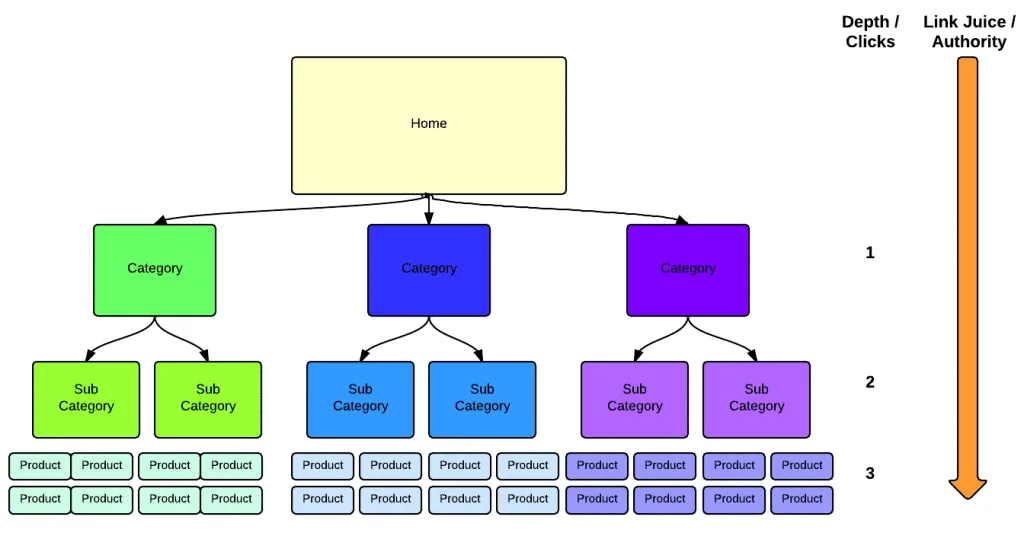
Why this shape works: your homepage holds most of your site's authority, and internal links pass it downward. A category one click from home inherits a lot of it. A product three clicks down still inherits enough. A product buried eight clicks deep, reachable only through pagination, inherits almost nothing and may not get crawled often. Google's own documentation on ecommerce site structure is explicit that a clear navigational hierarchy helps them understand which pages matter and how they relate.
Each level of the pyramid maps to a keyword tier. The category targets the head term ("running shoes"), subcategories target the qualified terms ("trail running shoes", "womens running shoes"), and products target the specific model searches. This is the architecture doing keyword targeting for you, which is exactly why it is half the game.
Make your URLs mirror the hierarchy and keep them readable: /running-shoes/trail/ beats a string of IDs and parameters. Google publishes specific guidance on URL structure for ecommerce sites, and the theme is the same: descriptive, consistent, minimal parameters.
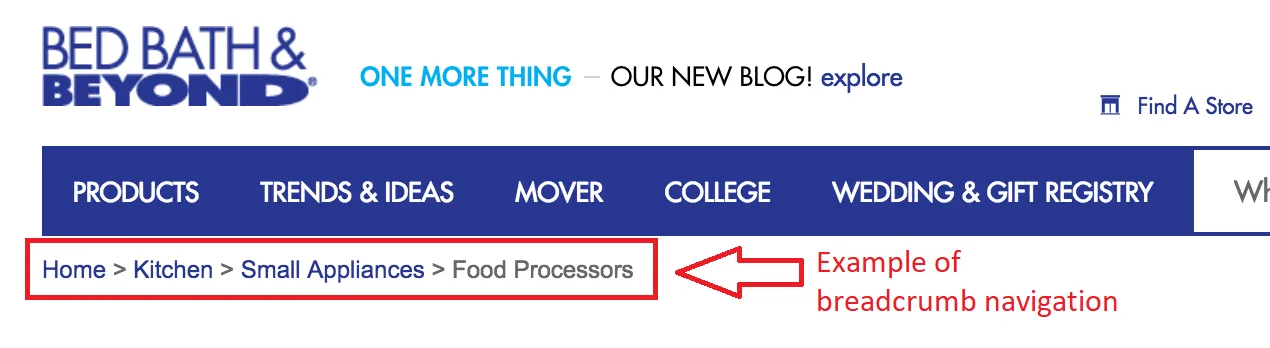
Add breadcrumbs to every category and product page. They repair the hierarchy for users who land mid-pyramid from search, they add descending internal links on every page, and with breadcrumb markup they can show in your search snippets.
Faceted Navigation: The Biggest Crawl Trap in Ecommerce
Faceted navigation, the filter sidebar for size, color, price, and brand, is the single most common way stores hurt themselves technically. Every filter combination usually gets its own parameter URL, and the combinations multiply into what Google's faceted navigation documentation calls infinite URL spaces. Google names two direct consequences: overcrawling, where crawlers burn resources on useless URLs, and slower discovery of the pages you actually want indexed.
The default fix is blunt and effective: block crawling of filter parameter URLs in robots.txt, which is the first option Google itself recommends when you do not need those URLs indexed. Most stores do not.
The exception is the interesting part. Some facet combinations deserve to be real, indexable pages, and the test is two questions. Is there search demand for the combination, and do you have enough inventory to make the page worth landing on? "Waterproof hiking boots" passes for most outdoor stores. "Blue waterproof hiking boots under $80 in size 9.5" does not. When a facet passes, promote it: give it a clean static URL, a proper title, and internal links from its parent category, and treat it as a subcategory rather than a filter result.
Keyword Research: Map Every Keyword to a Page Type
The rule that makes ecommerce keyword research manageable: every keyword gets assigned to a page type before it gets assigned to a page. Category-style keywords go to category pages, product-specific keywords go to product pages, and question keywords go to guides. Most wasted ecommerce content budgets come from ignoring this rule and answering commercial queries with blog posts.
The mapping looks like this in practice. "Trail running shoes" is a category keyword: searchers want a browsable selection, and Google rewards category pages for it. A search for a specific brand and model is a product keyword, and the product page carries it. "How to choose trail running shoes" is a question keyword, and it belongs to a guide that links down to the category. When in doubt, search the keyword and look at what page types already rank. Google has effectively told you which template it wants; sending the wrong one is a fight you will lose.
To build the list itself, start from your catalog rather than a tool. Your categories and products are your seed keywords. Then expand with autocomplete, which shows you the qualifiers real buyers add:
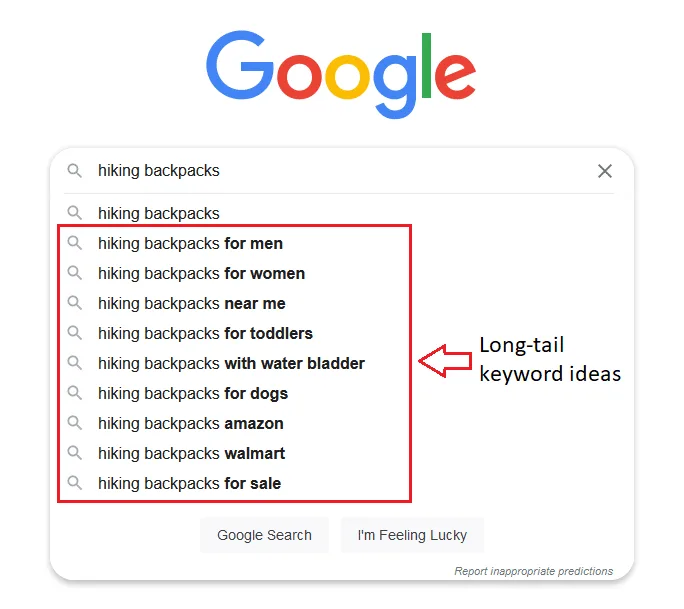
Those modifiers are architecture signals, not just keyword ideas. When "for women", "waterproof", or "with water bladder" keep showing up with real volume, that is demand for a subcategory or an indexable facet page. This is the point where keyword research and site structure become the same exercise, and it is worth doing before you build categories, not after.
Volume and difficulty data from any of the standard tools helps you prioritize, but prioritize with a bias the tools do not have: a category keyword at modest volume usually outearns an informational keyword at triple the volume, because the intent is purchase. We walk through our full research and prioritization workflow in our SEO process guide, and the ecommerce version differs only in that the destination for most terms is a template, not an article.
Category Pages: Optimize the Money Pages
Category pages earn the most valuable rankings in your store, and they need less copy than you think: a precise title tag, one clear H1, a couple of genuinely useful sentences up top, and strong internal links. The one thing they must never do is bury the product grid under an essay.
Start with the title tag and meta description, because for category pages the title is a large share of the optimization. Lead with the keyword, keep the brand at the end, and check the pixel width before shipping, since Google truncates long titles. Our free SERP snippet preview tool shows exactly how the title and description render before you publish.
Then the copy question, the one that ruins the most category pages: how much text does a category page need to rank? Enough to demonstrate what the page is and help a buyer choose, which is usually two or three sentences above the grid. Name the category, say who it is for, and state the choice the buyer faces. If there is genuinely useful buying advice to add, sizing, materials, how the options differ, put it below the product grid where interested buyers scroll and everyone else never has to see it. The 800-word keyword essay above the fold is a relic that hurts conversion and does not help rankings the way people hope. Shoppers came to see products; show them products.
Internal links do the rest of the work. Link subcategories prominently at the top of the parent category. Link sibling and related categories where a buyer might actually cross over. And keep the grid itself honest: a category page with two products is a bad landing page for users and a thin page for Google, so either merge it upward or keep it out of the index until the inventory justifies it.
Product Pages: Descriptions, Reviews, and Product Schema
A product page ranks when it does two things: answers the questions a buyer has right before purchase, and hands search engines complete structured data. In practice that means a unique description, real customer reviews, and full Product markup.
Unique descriptions, honestly handled. The problem is real: pasting the manufacturer's boilerplate puts the exact same text on your page as on every other store that stocks the item, which gives Google no reason to pick you. The honest answer at scale is prioritization, because nobody hand-writes 8,000 descriptions. Hand-write the products that drive your revenue and traffic, the top of the catalog. For the middle, use a structured template, materials, dimensions, use cases, care, what makes this one different, and fill it with real product specifics rather than adjectives. AI drafting is legitimate here if you feed it actual specs and edit what comes back; publishing unreviewed generated text across a catalog is how stores end up with confidently wrong product claims. And write down what buyers ask your support team, because those questions are the content the page is missing.
Reviews. Customer reviews are unique content you do not have to write, they answer buyer objections in the buyer's own language, and they keep the page fresh. Ask for them systematically after delivery, and mark them up so ratings can appear with your listing.
Product schema. The schema.org Product vocabulary is how you describe the product, price, availability, and ratings in machine-readable form. Google's Product structured data documentation splits it into two classes: product snippets for pages where the product cannot be bought directly, and merchant listings for pages where it can, with extra fields for shipping, returns, and apparel sizing. As a store you want the merchant listing requirements, and the more properties you complete, the more of the results real estate you are eligible for. The payoff looks like this in the wild:
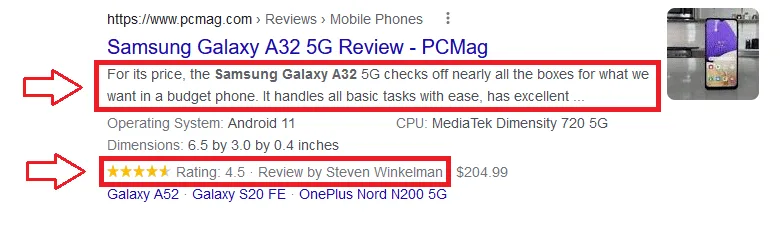
Price, stars, and availability directly in the snippet, before anyone clicks. Validate your markup with Google's Rich Results Test after any template change, because one template bug removes rich results from the entire catalog at once. This same markup becomes even more important in the AI section below.
Technical SEO for Online Stores
Ecommerce technical SEO comes down to four jobs: control what gets crawled, consolidate duplicates with canonicals, paginate so deep products still get found, and keep the store fast. Everything else is standard technical hygiene.
Crawl budget, sized honestly. Google's crawl budget documentation says it plainly: crawl budget is mainly a concern for large sites, on the order of a million-plus pages changing weekly, or 10,000-plus pages changing daily, or sites where Search Console shows a large share of URLs as "Discovered, currently not indexed". A 400-product store does not have a crawl budget problem until faceted navigation manufactures one, which is exactly why the robots.txt work from the architecture section matters even for smaller stores.
Canonicals on variants. When color and size variants live on separate URLs, they are near-duplicates competing with each other. Pick the main product URL as canonical and point the variants at it with rel="canonical", per Google's guidance on consolidating duplicate URLs. The same applies when a product is reachable under multiple category paths: one canonical URL, everywhere. Audit this after every platform migration, because broken canonicals are the classic silent traffic killer.
Pagination. For category pages that run long, Google's pagination guidance is to give every page in the series its own URL, link the pages sequentially with real anchor links, consider linking back to page one from each page in the series, and keep filtered or re-sorted versions of the series out of the index. If your category uses infinite scroll, make sure paginated URLs still exist underneath it, because a crawler does not scroll. A sitemap or a Merchant Center feed also helps Google find products that sit deep in the catalog.
Core Web Vitals, for conversion as much as rankings. The Core Web Vitals thresholds are concrete: Largest Contentful Paint within 2.5 seconds, Interaction to Next Paint at or under 200 milliseconds, and Cumulative Layout Shift at or under 0.1, each measured at the 75th percentile of real visits. On a store, CLS is the sneaky one: late-loading banners and badges shift the layout right as someone reaches for "Add to cart". The ranking effect of vitals is modest; the revenue effect of a store that feels instant is not, and you can see it in your own analytics whenever the site slows down. Treat speed as conversion work that happens to please Google.
Content and Link Building for Stores
Stores earn links the same way everyone else does, with content that deserves them, but stores have angles most sites lack: buying guides attached to categories, gift guides with seasonal demand spikes, data from their own sales, and free tools buyers actually use.
Buying guides are the workhorse. Every question keyword from your research becomes a guide that answers it properly and links down to the category where the reader can act. The guide ranks for the question, feeds authority and qualified visitors to the money page, and gives other sites something worth citing, which a category page rarely is. Our guide on writing SEO content covers the production process; the ecommerce twist is simply that every piece should have a category or product page it exists to support.
Gift guides work because demand for "gifts for new dads" or "gifts under $50" spikes reliably every season and journalists assemble roundups against the same calendar. Publish them well before the season, weeks to months early, so they have time to be indexed, ranked, and cited before peak search demand hits, and refresh the same URL each year instead of starting from zero.
Data pieces are the most underused asset in ecommerce link building. Your store sits on purchase data nobody else has: what sells where, when demand starts each season, how preferences shift year over year. Anonymize it, publish the trends, and you have the kind of original statistics that writers link to because they cannot get them anywhere else.
Free tools, sizing calculators, quantity estimators, comparison pickers, earn links for years for one build cost, and they double as conversion aids on the pages that matter.
What we would skip in 2026: bulk guest posting and paid link schemes. The risk profile is bad and getting worse, and the assets above outperform them anyway.
The 2026 Layer: AI Shopping Surfaces
AI assistants now recommend products directly. Google's AI Overviews and AI Mode answer shopping queries with products and cited sources, and ChatGPT recommends products in conversation. You do not reach these surfaces with tricks. You reach them by being feed-clean, schema-complete, and readable by machines.
Start with what Google says on the record: their documentation on AI features in Search states there are no additional requirements to appear in AI Overviews or AI Mode beyond standard SEO best practices. Read that as good news: everything in this guide is also your AI visibility work. The shopping-specific layer runs on product data, so keep your Merchant Center product feed complete and consistent with what your pages and schema say. When the feed says one price and the page says another, you look unreliable to systems that decide what to recommend.
ChatGPT made the same infrastructure move explicit: OpenAI publishes a product feed specification so ChatGPT can index and display products with current price and availability, and it accepts Google-compatible product data formats. The practical takeaway is cheerful: the clean feed and complete Product schema you built for Google now pay a second time on a surface most competitors have not thought about.
Beyond feeds, assistants recommend what they can read and verify. That means clean HTML, direct answers near the top of pages, consistent product facts everywhere your brand appears, and crawler access: blocking AI crawlers in robots.txt quietly removes you from consideration, so check which AI crawlers can reach your site. The broader discipline is called generative engine optimization, and our GEO guide covers it in depth. For a quick gut check, run your store through our free AI visibility checker and then ask ChatGPT for recommendations in your category. If your products never come up, that gap is now part of your SEO roadmap.
Measurement, Timelines, and What Ecommerce SEO Costs
Measure ecommerce SEO in revenue by page type, not just traffic. Expect the first meaningful movement in 3 to 6 months, compounding returns after 6 to 12, and budget anywhere from a few hundred dollars a month doing it yourself to four or five figures with professionals.
On measurement: segment everything by template. In Search Console, filter performance by URL path so category pages, product pages, and guides report separately, because "traffic is up 20%" means nothing if the growth is all blog and the money pages are flat. In GA4, follow organic sessions through to transactions and revenue by landing page type. Watch three leading indicators while revenue lags: indexed pages trending toward your intended catalog (and not beyond it, which signals crawl trap leaks), impressions on category terms, and average position on your target keyword list.
On timelines, honestly: an established store fixing architecture and templates can see movement in a few months, because fixes apply to thousands of pages at once. A new domain in a competitive category is realistically a year-plus from ranking for head category terms, with long-tail product and guide traffic arriving much earlier. Anyone quoting guaranteed rankings on a fixed date is selling something other than SEO.
On cost: doing it yourself runs a few hundred dollars a month in tools plus real hours. Freelancers and consultants vary widely with experience, and our guide to hiring an organic SEO consultant covers how to vet them. Agency retainers for ecommerce typically land between roughly $1,500 and $10,000+ per month depending on catalog size and competitiveness. For reference, our own managed SEO plans start at $1,499 per month, and the Happy Healthy Hippie numbers at the top of this guide are what that work produced for an ecommerce brand.
Ecommerce SEO FAQ
How long does ecommerce SEO take to work?
For most stores, the first meaningful movement shows in 3 to 6 months, with compounding results after 6 to 12. Established stores move faster because template and architecture fixes apply to thousands of pages at once. A brand-new domain in a competitive category can take a year or more to rank for head category terms, while long-tail traffic arrives much sooner.
Should I optimize category pages or product pages first?
Category pages first. They target the highest-volume commercial keywords, they concentrate your internal authority, and one improved category template lifts every category at once. Then work through product pages in order of revenue and traffic.
How much does ecommerce SEO cost?
Doing it yourself typically costs a few hundred dollars a month in tools plus your time. Agency retainers for ecommerce typically run from around $1,500 to $10,000+ per month depending on catalog size and competition. Our managed SEO starts at $1,499 per month.
Does every product need a unique description?
Every product you want to rank does, because manufacturer boilerplate puts identical text on your page and every competitor's. Prioritize by revenue: hand-write the top of the catalog, use a spec-driven template for the middle, and let low-value long-tail items wait. AI drafting works at scale if you feed it real product specifics and edit the output before publishing.
How do I get my products recommended by ChatGPT and Google's AI results?
Google says there are no special requirements for AI Overviews and AI Mode beyond standard SEO best practices, so your ranking work carries over. For the shopping layer, keep a complete and accurate product feed: Google's shopping surfaces draw on Merchant Center, and OpenAI publishes a ChatGPT product feed spec that accepts Google-compatible data. Add complete Product schema, consistent facts across the web, and open access for AI crawlers.